Showing posts with label Drupal Channel. Show all posts

Tuesday, December 17, 2019

Drupal 7 - How To Install, Enable and Configure Draggable CAPTCHA

CentOS 7 / Drupal 7


How To Install, Enable and Configure Draggable CAPTCHA


# cd sites/all/modules/
# wget https://ftp.drupal.org/files/projects/draggable_captcha-7.x-1.2.tar.gz
--2019-12-04 12:40:50--  https://ftp.drupal.org/files/projects/draggable_captcha-7.x-1.2.tar.gz
Resolving ftp.drupal.org (ftp.drupal.org)... 151.101.2.217, 151.101.66.217, 151.101.130.217, ...
Connecting to ftp.drupal.org (ftp.drupal.org)|151.101.2.217|:443... connected.
HTTP request sent, awaiting response... 200 OK
Length: 73408 (72K) [application/octet-stream]
Saving to: ‘draggable_captcha-7.x-1.2.tar.gz’

100%[==========================================================================================================================================================================================>] 73,408      --.-K/s   in 0.004s

2019-12-04 12:40:51 (16.2 MB/s) - ‘draggable_captcha-7.x-1.2.tar.gz’ saved [73408/73408]

# tar -zxvf draggable_captcha-7.x-1.2.tar.gz
draggable_captcha/
draggable_captcha/draggable-captcha-mini.tpl.php
draggable_captcha/draggable_captcha.info
draggable_captcha/css/
draggable_captcha/css/draggable-styles.css
draggable_captcha/css/images/
draggable_captcha/css/images/bwm-captcha.png
draggable_captcha/css/images/blank.gif
draggable_captcha/css/images/bwm-captcha-mini.png
draggable_captcha/css/iepngfix.htc
draggable_captcha/css/styles-mini.css
draggable_captcha/README.txt
draggable_captcha/js/
draggable_captcha/js/draggable_captcha.js
draggable_captcha/js/draggable_captcha_mini.js
draggable_captcha/draggable_captcha.module
draggable_captcha/LICENSE.txt

draggable_captcha/draggable-captcha.tpl.php


Then, click on Save configuration.


Then, click on Save configuration.


Great Success!


REFERENCES


https://www.drupal.org/project/draggable_captcha


Monday, December 9, 2019

Drupal 7 - How To Enable 1-Character Sitewide Search For Chinese Customers

CentOS 7 / Drupal 7


How To Enable 1-Character Sitewide Search For Chinese Customers


Recently, we received a complaint from a Chinese customer who was looking for eye care products on our website.  Instead of providing them with a list of all of our products with the word "eye" in it, she was confronted with an error message stating that the search needed to be a minimum of three characters.


Well, in Chinese, this "character"  means eye:


Obviously, the search component needed to be re-configured to reduce the length of the search string to a single (1) character.

Here's how I did that:


Then click on Configuration


Change Minimum word length to index to 1 and then click on Save configuration.

After that, Chinese search with one character worked!

CAUTION:  Reducing the Minimum word length to index value to 1 character can create a LOT of search indexing and may affect the performance of your Drupal website.  Implement with care.

Great Success!


REFERENCES:


Wednesday, December 4, 2019

Drupal 7 - How To Give Order Notification Emails More Informative Subject Lines

CentOS 7 / Drupal 7


How To Give Order Notification Emails More Informative Subject Lines


Great Success!


REFERENCES

https://www.drupal.org/docs/7/modules/ubercart/howtos/how-to-customize-the-order-invoice-customer-e-mail

https://www.ostraining.com/drupal-support/12510-editing-email-confirmation-template-in-ubercart/

https://www.google.com/search?client=firefox-b-d&q=drupal+7+conditional+actions


Tuesday, December 3, 2019

Drupal 7 - How To Enable Search by USERNAME or EMAIL in Drupal 7

CentOS 7 / Drupal 7


How To Enable Search by USERNAME or EMAIL in Drupal 7


# pwd
<drupal_root>/sites/all/modules
# wget https://ftp.drupal.org/files/projects/find_people-7.x-1.0.tar.gz
--2019-12-03 22:19:01--  https://ftp.drupal.org/files/projects/find_people-7.x-1.0.tar.gz
Resolving ftp.drupal.org (ftp.drupal.org)... 151.101.2.217, 151.101.66.217, 151.101.130.217, ...
Connecting to ftp.drupal.org (ftp.drupal.org)|151.101.2.217|:443... connected.
ERROR: cannot verify ftp.drupal.org's certificate, issued by ‘/C=BE/O=GlobalSign nv-sa/CN=GlobalSign CloudSSL CA - SHA256 - G3’:
  Issued certificate not yet valid.
To connect to ftp.drupal.org insecurely, use `--no-check-certificate'.

hmmm, interesting.  First time I saw that!

# wget https://ftp.drupal.org/files/projects/find_people-7.x-1.0.tar.gz --no-check-certificate
--2019-12-03 22:19:48--  https://ftp.drupal.org/files/projects/find_people-7.x-1.0.tar.gz
Resolving ftp.drupal.org (ftp.drupal.org)... 151.101.2.217, 151.101.66.217, 151.101.130.217, ...
Connecting to ftp.drupal.org (ftp.drupal.org)|151.101.2.217|:443... connected.
WARNING: cannot verify ftp.drupal.org's certificate, issued by ‘/C=BE/O=GlobalSign nv-sa/CN=GlobalSign CloudSSL CA - SHA256 - G3’:
  Issued certificate not yet valid.
HTTP request sent, awaiting response... 200 OK
Length: 8649 (8.4K) [application/octet-stream]
Saving to: ‘find_people-7.x-1.0.tar.gz’

100%[===================================================================================================================================================================================================>] 8,649       --.-K/s   in 0s

2019-12-03 22:19:49 (20.8 MB/s) - ‘find_people-7.x-1.0.tar.gz’ saved [8649/8649]


# tar -zxvf find_people-7.x-1.0.tar.gz
find_people/
find_people/find_people.admin.inc
find_people/find_people.module
find_people/README.txt
find_people/LICENSE.txt
find_people/find_people.info
#


Click on Save configuration.


Great Success!


REFERENCES


https://www.drupal.org/project/find_people


Monday, December 2, 2019

Drupal 8 - How To Add A Poll To A Drupal 8 Website

CentOS 7 / Drupal 8


How To Add A Poll To A Drupal 8 Website


The MMTM YouTube Channel is a powerful way to engage with people - but it doesn't go far enough!  We think an important strategy for building up a sustainable Subscribers base for My Man The Maker involves encouraging the existing Subscribers of other websites, like YouTube, to also Subscribe directly to mymanthemaker.com.  Of course, the overarching intention is to convert YouTube Subscribers into direct MMTM customers, with nobody in between - no matter how excellent they or their services may be.  Times can change, and without a direct connection to its own Subscribers and Customers, MMTM would always have a weakness.  A disruption to that 3rd party, planned or otherwise, could really hurt MMTM, perhaps fatally.


So, how can you go about attracting people from popular social media sites to your own website?  One time-proven way of increasing a connection with Subscribers is to increase interaction via Contests and Polls.  One of the easiest contests to run is a Poll, where you pose a question and then let people weigh in on what option (which you also provide) is their preferred choice.

Now, Drupal has featured Polls for as long as I can remember - at least since Drupal 6 - but I have never had occasion to use it.  Well, that situation has now changed!  I now urgently need to be able to run Polls for the purpose of rewarding people who came over from YouTube (or wherever else) to www.mymanthemaker.com so they could give their opinions and maybe win something.  In return, I am prepared to (maybe) give them a reward - via some kind of giveaway contest.  Also, while they are visiting the mymanthemaker.com website, I can do everything I can to convince them to buy something from its online store!

Polls on YouTube are called Cards, and they are a very powerful and popular way of engaging with people on YouTube.  The only problem is that when you use a YouTube Poll,. you only get limited flexibility and you lose the ability to do things with the user that YouTube may not have (or may never) implement.

First I needed to set the stage on YouTube, so what I did was mention the Poll live (in the video) as well as in the video description.  The video description featured a clear call to action for people to Subscribe to my YouTube channel, and then go over to mymanthemaker.com, register there as well and then vote in a Poll to have a chance to win!


Once I was done with YouTube, the next thing I needed to do was to extend the user definition in Drupal 8 by adding a custom field, YouTube Name to the user type.  

This is explained in great detail in another article entitled How To Add A Custom Field To Drupal 8's Create New Account Screen.  

The next piece of the puzzle was to install and enable a poll in Drupal 8.  The Poll Module for Drupal 8 is available at www.drupal.org, and here's an Overview and Features of the Drupal Poll Module:


Here's some Project information regarding the Drupal Poll Module:


Installing the Poll Module was quite simple and easy:  I just right-clicked on the tar.gz (41.25 KB) link in the Project Information area, copied the link address and then navigated to my Linux CLI and did the following:

# pwd
<drupal_root>/sites/all/modules

NOTE:  <drupal_root> is just a place holder for your location in the file system!

# wget https://ftp.drupal.org/files/projects/poll-8.x-1.3.tar.gz
--2019-12-02 19:09:03--  https://ftp.drupal.org/files/projects/poll-8.x-1.3.tar.gz
Resolving ftp.drupal.org (ftp.drupal.org)... 151.101.2.217, 151.101.66.217, 151.101.130.217, ...
Connecting to ftp.drupal.org (ftp.drupal.org)|151.101.2.217|:443... connected.
HTTP request sent, awaiting response... 200 OK
Length: 42235 (41K) [application/octet-stream]
Saving to: ‘poll-8.x-1.3.tar.gz.1’

100%[======================================>] 42,235      --.-K/s   in 0.003s

2019-12-02 19:09:03 (11.8 MB/s) - ‘poll-8.x-1.3.tar.gz.1’ saved [42235/42235]


# tar -zxvf poll-8.x-1.3.tar.gz
poll/
poll/README.md
poll/config/
poll/config/install/
poll/config/install/core.entity_view_mode.poll.teaser.yml
poll/config/install/views.view.poll_admin.yml
poll/config/install/views.view.poll_list.yml
poll/css/
poll/css/poll.base-rtl.css
poll/css/poll.base.css
poll/css/poll.theme-rtl.css
poll/css/poll.theme.css
poll/js/
poll/js/poll.admin.js
poll/poll.info.yml
poll/poll.install
poll/poll.libraries.yml
poll/poll.links.action.yml
poll/poll.links.menu.yml
poll/poll.links.task.yml
poll/poll.module
poll/poll.permissions.yml
poll/poll.routing.yml
poll/poll.services.yml
poll/poll.tokens.inc
poll/src/
poll/src/Controller/
poll/src/Controller/PollController.php
poll/src/Entity/
poll/src/Entity/Poll.php
poll/src/Entity/PollChoice.php
poll/src/Form/
poll/src/Form/PollDeleteForm.php
poll/src/Form/PollForm.php
poll/src/Form/PollItemsDeleteForm.php
poll/src/Form/PollSettingsForm.php
poll/src/Form/PollViewForm.php
poll/src/Form/PollVoteDeleteForm.php
poll/src/Plugin/
poll/src/Plugin/Block/
poll/src/Plugin/Block/PollRecentBlock.php
poll/src/Plugin/Field/
poll/src/Plugin/Field/FieldWidget/
poll/src/Plugin/Field/FieldWidget/PollChoiceDefaultWidget.php
poll/src/Plugin/views/
poll/src/Plugin/views/field/
poll/src/Plugin/views/field/PollStatus.php
poll/src/Plugin/views/field/PollTotalVotes.php
poll/src/PollAccessControlHandler.php
poll/src/PollChoiceInterface.php
poll/src/PollChoiceTranslationHandler.php
poll/src/PollChoiceTranslationMetadataWrapper.php
poll/src/PollInterface.php
poll/src/PollListBuilder.php
poll/src/PollPostRenderCache.php
poll/src/PollStorage.php
poll/src/PollStorageInterface.php
poll/src/PollViewBuilder.php
poll/src/PollViewData.php
poll/src/PollVoteStorage.php
poll/src/PollVoteStorageInterface.php
poll/templates/
poll/templates/poll-meter.html.twig
poll/templates/poll-results.html.twig
poll/templates/poll-vote.html.twig
poll/tests/
poll/tests/src/
poll/tests/src/Functional/
poll/tests/src/Functional/PollBlockTest.php
poll/tests/src/Functional/PollCreateTest.php
poll/tests/src/Functional/PollDeleteChoiceTest.php
poll/tests/src/Functional/PollExpirationTest.php
poll/tests/src/Functional/PollFieldTest.php
poll/tests/src/Functional/PollFieldUITest.php
poll/tests/src/Functional/PollHtmlSpecialCharactersTest.php
poll/tests/src/Functional/PollListTest.php
poll/tests/src/Functional/PollTestBase.php
poll/tests/src/Functional/PollTokenReplaceTest.php
poll/tests/src/Functional/PollViewTest.php
poll/tests/src/Functional/PollVoteCheckHostnameTest.php
poll/tests/src/Functional/PollVoteMultilingualTest.php
poll/tests/src/Functional/PollVoteTest.php
poll/tests/src/FunctionalJavascript/
poll/tests/src/FunctionalJavascript/PollVoteJavascriptTest.php
poll/LICENSE.txt

With the Poll Module installed, I then used the Drupal 8 Administrator GUI to enable the module, by selecting it and then clicking on Install:


Once the Poll Module is was installed and enabled, a new content option (Polls), appeared in the Content area of the Drupal 8 Administrator GUI:


When I clicked on Polls, it led to an area where you can Add a poll:


I then used the provided form to construct a Poll regarding the Helmet Poll I wanted to run for a project I am working on, EZ-RIDER:


When I was finished, I clicked on SAVE.  

With the Poll constructed, I next needed to figure out where to show the Poll to my Authenticated users.  I figured the LEFT SIDEBAR would be a good place for that, so I navigated to HOME -> Administration -> Structure -> Block layout and decided to put the Most recent poll in Sidebar First.  

Considering that there is only one Poll at the moment, that seemed like a reasonable choice.


Finally, I wanted only Authenticated users, i.e. people who had gone through the Create an account process of www.mymanthemaker.com to be able to see the poll and vote, so I had to go to the area of the Drupal Administrative GUI that controlled Poll visibility and adjust the permissions accordingly:


Once I was in the right place, I adjusted the permissions so that only Authenticated users could see the Poll:


OK, with all of that done...time for some testing!

Will the poll show NOT show up for an Anonymous user?


Success!...but not quite finished yet...

Will the Poll I just created show up for an Authenticated user, like my test user?


REFERENCES:

https://www.drupal.org/project/poll

https://www.drupal.org/project/pollfield/issues/714924


Drupal 8 - How To Add A Custom Field To Drupal 8's Create New Account Screen

CentOS 7 / Drupal 8


How To Add A Custom Field To Drupal 8's Create New Account Screen


One of the things that I would dearly love to do with my growing Tube Creator Channel (MY MAN THE MAKER) is to have the ability to give away prizes to my YouTube Subscribers via Contests and Polls.  

YouTube has a poll feature, but it doesn't do exactly what I want (encourage people to double-register at both YouTube and mymanthemaker.com, so I can increase engagement).  Now, polls have been a feature of Drupal for a very long time, since at least Drupal 6, but I have never had occasion to use them...until now!  

But before I can start giving away free prizes at mymanthemaker.com, I to put a means in place that ensures that whatever winner(s) get chosen, they are among my current YouTube Subscribers.  Part of setting up this functionality is to ask people what their YouTube Name is, as they are creating their new account at mymanthemaker.com.

Currently, the Create new account screen at mymanthemaker looks like this:


What I wanted to do was to add a custom field to the Create new account screen to people could suppy their YouTube Name at the time of account creation.

Turns out this task is fairly easy, and here's how I did it:

First I navigated to the Home -> Administration -> Configuration -> People area of the Drupal 8 Administration GUI, and then I clicked on Manage fields:


Next, I clicked on Add field:


Next, I Iselected Text (plain) as the field type and gave the field a meaningful name.  In my case, I chose to call the new field YouTube Name:


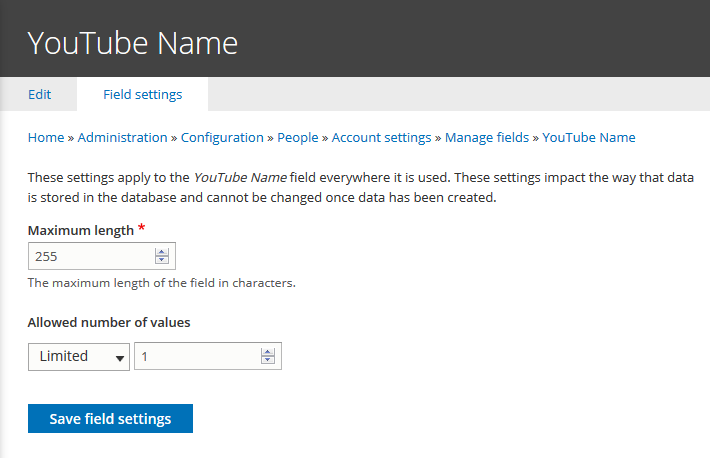
Next, I supplied some information about the the field, such as its Maximum length, and Allowed number of values.  In my case, I accepted the defaults:


Next, I provided some settings information for the new YouTube Name field, in particular I wrote Help Text that (I hope) explains the presence of this new field in the registration page:


Once I had finished supplying the information I clicked on Save settings.  I was then presented with these results:


Everything looked great!

I next navigated to www.mymanthemaker.com and clicked on Login


Strangely, in this website and maybe in Drupal in generatl, the Create new account functionality is hiding behind the Login feature, something that I always thought should be separate from one another because it is a slightly confusing place for such functionality to be lurking.

Next I clicked on Create New Account in the Login screen:


Now the mymanthemaker.com new user registration page looked like this:


REFERENCES:


Saturday, November 30, 2019

Drupal 7 - How To Reduce Payment Methods Confusion at Ubercart Checkout (Bank Transfer)

CentOS 7 / Ubercart 7


How To Reduce Payment Methods Confusion at Ubercart Checkout


One thing we notice with our Drupal 7 eCommerce website is confusion when it comes to selecting a Payment Method during checkout.

When we offer a single payment method (PayPal, for example), the customer gets to the Payment Method selection pane in checkout and then doesn't know what to do, because they are asked to make a choice - and then not presented with a choice.

The easy way to get around this is to offer something like an Offline Payment Method


Here's where and how to get it:


First, I backed up my site...

# ./backup.mobile.holisticpethelp.com.bash
backing up website...
Backing up database...

DONE!

Then I installed the module by:

A)  Right-clicking tar.gz (13.57 KB) in the Downloads area

B)  Selecting Copy link address 

C) Navigating to the Linux CLI

D) Performing the following:

# pwd
<drupal_root>/sites/all/modules
# wget https://ftp.drupal.org/files/projects/uc_bank_transfer-7.x-1.0-beta1.tar.gz
--2019-11-30 07:39:55--  https://ftp.drupal.org/files/projects/uc_bank_transfer-7.x-1.0-beta1.tar.gz
Resolving ftp.drupal.org (ftp.drupal.org)... 151.101.2.217, 151.101.66.217, 151.101.130.217, ...
Connecting to ftp.drupal.org (ftp.drupal.org)|151.101.2.217|:443... connected.
HTTP request sent, awaiting response... 200 OK
Length: 13899 (14K) [application/octet-stream]
Saving to: ‘uc_bank_transfer-7.x-1.0-beta1.tar.gz’

100%[========================================================>] 13,899      --.-K/s   in 0.001s

2019-11-30 07:39:56 (16.1 MB/s) - ‘uc_bank_transfer-7.x-1.0-beta1.tar.gz’ saved [13899/13899]

# tar -zxvf uc_bank_transfer-7.x-1.0-beta1.tar.gz
uc_bank_transfer/
uc_bank_transfer/uc_bank_transfer.admin.inc
uc_bank_transfer/README.txt
uc_bank_transfer/uc_bank_transfer.install
uc_bank_transfer/LICENSE.txt
uc_bank_transfer/uc_bank_transfer.module
uc_bank_transfer/uc_bank_transfer.info
uc_bank_transfer/template/
uc_bank_transfer/template/uc-order--customer-bank_transfer.tpl.php


The next step was to use the Drupal 7 Administrator GUI to turn ON the Bank Transfer Module:


Then, click on Save configuration:


After that, navigate to the Configuration page of the Payment Methods area of Store (Ubercart), and click on settings:


Enter the appropriate information under BANK DETAILS (by clicking on it to expand it) and then click on Save configuration:


Next, we needed to enable Translation for the Ubercart Bank Transfer Module.

Confusingly, the translation of text is done in two different places in Drupal 7, depending on what the nature of the text is (Constant or a Variable).


How To Translate Ubercart Bank Transfer Constants in Drupal 7


Ubercart Bank Transfer Module Constants are translated in the Translate interface area:


The next part is to Translate Variables, so the 


How To Translate Ubercart Bank Transfer Variables in Drupal 7


Ubercart Bank Transfer Module Variables are a bit trickier to accomplish.

First, the variables must be activated as multilingual variables in the Multilingual settings interface of the Regional and language area:


After that, the individual strings can be translated in the Bank Transfer settings area:


Conclusion:


After putting in the Ubercart Bank Transfer Module, things worked "OK", but we didn't love it because it uses a workflow that we think will confuse our customers:

1)  It results in an "Order Complete" message, but that's not strictly true.  We would prefer that the message reads "Order Pending Transfer Confirmation" or something like that.

2)  The module didn't demand a transaction / confirmation number from the user, which we would prefer to have happen rather than proceeding through the checkout - we are never going to ship before receiving payment, so stalling the transaction at this point makes sense to us.

I hope to modify the Ubercart Bank Transfer Module to suit our needs better, and mirror our other payment methods.  So, look for a future post about How To Make The Bank Transfer Module Work Like PayPal.


REFERENCES:


https://www.drupal.org/project/uc_bank_transfer